


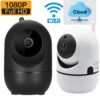
Wifi Smart Tracking Auto Camera
Price range: $55.99 through $62.99 (-30%)
Brand Name: CHIPROUND
Style: Mini Camera
Type: IP Camera
Connectivity: IP/Network Wireless
Supported Operating Systems: Windows 7
Supported Operating Systems: Windows 8
Supported Operating Systems: Windows 10
High Definition: 2.0 Megapixels
Lens (mm): 3.6mm
Installation: Ceiling
Power Supply(V): 100-250V
Dimensions (L x W x D)(mm): 11*7*8cm
Model Number: DR705
Network Interface: Wi-Fi/802.11/b/g
Wall Bracket: Side
Supported Mobile Systems: Android
IR Distance(m): 10M
Special Features: Vandal-proof
Viewing Angle : 90°
Megapixels: 2MP
Power Consumption(W): 3w
Storage: None
Sensor Brand: Sony
Alarm Action: Local Alarm
Video Compression Format: H.264
is_customized: Yes
Technology: Infrared
Power Supply: Normal
TF Card: None
Color: White
Color: Black
Audio Output: 1CH RCA
Minimum Illumination(Lux): 0.01LUX
Sensor: CMOS
Description
1080P Wireless IP Camera Cloud Wifi Smart Auto Tracking Human Home Security Surveillance CCTV Network
How To Set Up The Camera
1. Download and Install the App
a. Make sure your mobile devices are connected to the network properly (Wi-Fi)
b .For Android phone users, download the free app by searching “YCC365/ “YCC365 plus” in “Google Play Store” or scanning the QR-Code on the camera package.
c. For iPhone or iPad users, download the free app by searching “YCC365/YCC365 plus” in “App Store” or scanning the QR-Code on the camera package.
2. Connect the Cloud IP Camera
a. Open your APP “YCC365/ “YCC365 plus”
, register a new account or log in your old account
b. Add the camera device (You can choose four ways to add your camera)
c. When your add your camera, please put your camera in a place where the wifi signal is stable (Put your phone and camera closer)
Cannot Connect To WIFI Successfully?
1.Please make sure the WIFI Password is correct.(Our Camera Only Support 2.4Ghz Wifi)
2.Please make sure the router signal is stable (place IP Camera close to your router for first connection is Recommended).The Camera will not work on a 5Ghz wireless standard at this time. If you have a dual-band router, be sure to segregate your wireless channels and connect the Camera to the 2.4ghz channel.
3.Please check that your wifi name and password do not have special symbols, our camera can only recognize English letters and numbers..
Reset
Check The IP Camera: please make sure the IP Camera send Waiting for connection message after the plug. If not, we need to reset the Camera.
1.Why Reset:
Reset is used to boost the IP Camera system, which become more efficient to accept the unknown router and connect it.
Reset will erase all user settings including WIFI information, access password, alarm information, arming zones information.
2.The Steps:
Find the reset hole at the bottom of the device, and then use needle to insert it, press it more more than three seconds after hearing “di” sound, when hearing ‘Reset to be defaulted setting’ sound, then camera reset successfully.
3.After the reset, user can start to connect it by WIFI.
FAQ -Cloud Storage Wifi Camera
1)Have to buy cloud storage service?
This camera has cloud storage and ordinary card storage capabilities, do not want to buy cloud storage, you can insert a sd card for recordings.
2)What can we do when the camera be stolen?
Do not worry,camera with cloud storage capabilities, video stored in the cloud server, the camera was stolen, the videos can be found by cloud storage account.
3)Does cloud storage camera can support recording for SD Card and cloud storage at the same time?
Yes. Support SD Card and cloud storage recordings at the same time if you put SD Card and purchase cloud storage service
4)Which cloud service company you use?Is it free ?
We use Amazon cloud server. Yes have long cloud service,everyone can enjoy the cloud storage service for free,after that you can choose to pay for the service with a low cost.but this service for free need buyer contact cloud storage customer service help you open!
5)How to protect privacy of individual from Cloud?
The server Is Amazon cloud,support US-EU Safe Harbor and ISO/IEC27001:2013,it with High safety certification


Specification
Additional information
| Weight | N/A |
|---|---|
| Dimensions | N/A |
| Sensor Size | 1080P-Black, 1080P-White, 720P-Black, 720P-White |
| Plug Type | AU Plug, EU Plug, UK Plug, US Plug |
| Power Consumption(W) | 3w |
| Dimensions (L x W x D)(mm) | 11*7*8cm |
| Audio Output | 1CH RCA |
| Lens (mm) | 3.6mm |
| Power Supply(V) | 100-250V |
| Special Features | Vandal-proof |
| Power Supply | Normal |
| High Definition | 2.0 Megapixels |
| Technology | Infrared |
| Minimum Illumination(Lux) | 0.01LUX |
| Style | Mini Camera |
| is_customized | Yes |
| Sensor Brand | Sony |
| Installation | Ceiling |
| Wall Bracket | Side |
| Supported Operating Systems | Windows 10 |
| Viewing Angle | 90° |
| Video Compression Format | H.264 |
| Color | Black |
| Model Number | DR705 |
| Network Interface | Wi-Fi/802.11/b/g |
| Brand Name | CHIPROUND |
| Type | IP Camera |
| Supported Mobile Systems | Android |
| Storage | None |
| Megapixels | 2MP |
| Connectivity | IP/Network Wireless |
| Alarm Action | Local Alarm |
| IR Distance(m) | 10M |
| TF Card | None |
| Sensor | CMOS |


Reviews
There are no reviews yet.